Take control of your gaming experience.
Powerful, carefully designed software utilities that give PC gamers more control over their setup.
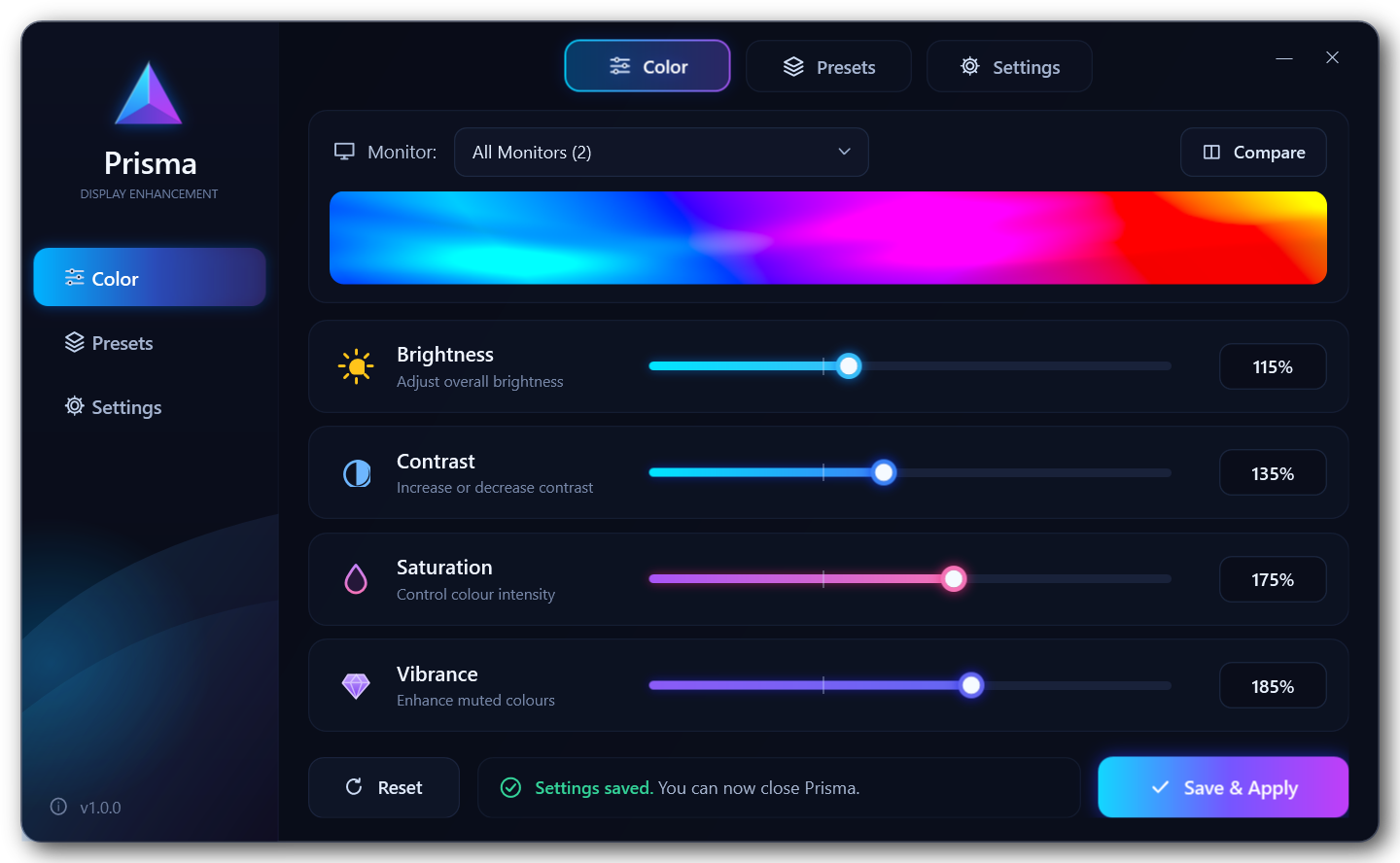
Actual screenshot of Prisma Colour v1.0.0 running on Windows — per-monitor hardware colour controls, live preview, and instant Before & After comparison.
Focused utilities designed to work together.
Independent, lightweight Windows applications unified under one clean design language — without bloat, forced accounts, or unnecessary background processes.
Prisma Colour
Customise your display's Brightness, Contrast, Saturation, and Vibrance using Windows' native hardware display calibration pipeline. Apply your look, close the app, and game with zero background processes.
Windows 10 / Windows 11, 64-bit • 143 KB ZIP • Zero telemetry
Color tab — Monitor selector, live preview strip, and 0%–300% sliders.
Brightness adjustment
Smooth perceptual exposure and dark-detail lift from 0% to 300% with highlight roll-off and a safe minimum floor so 0% never blacks out your screen.
Contrast adjustment
Filmic sigmoidal S-curve contrast from 0% to 300% that expands dynamic range while avoiding harsh shadow crushing and highlight clipping.
Saturation adjustment
Hardware 3×3 linear CIEXYZ chroma expansion from 0% (greyscale) to 300%, keeping pure whites and neutral greys free of colour cast.
Vibrance adjustment
Skin-tone-aware perceptual chroma enhancement paired with subtle midtone depth, plus soft compression when combined with high saturation.
Multi-monitor support
Automatically detects connected displays with model name, resolution, and refresh rate. Tune each monitor independently or adjust all displays together.
Custom presets
Includes 5 built-in presets (Default, Gaming, OLED Pop, Neon, Visibility) plus unlimited named custom presets saved locally on your PC.
Before & After compare
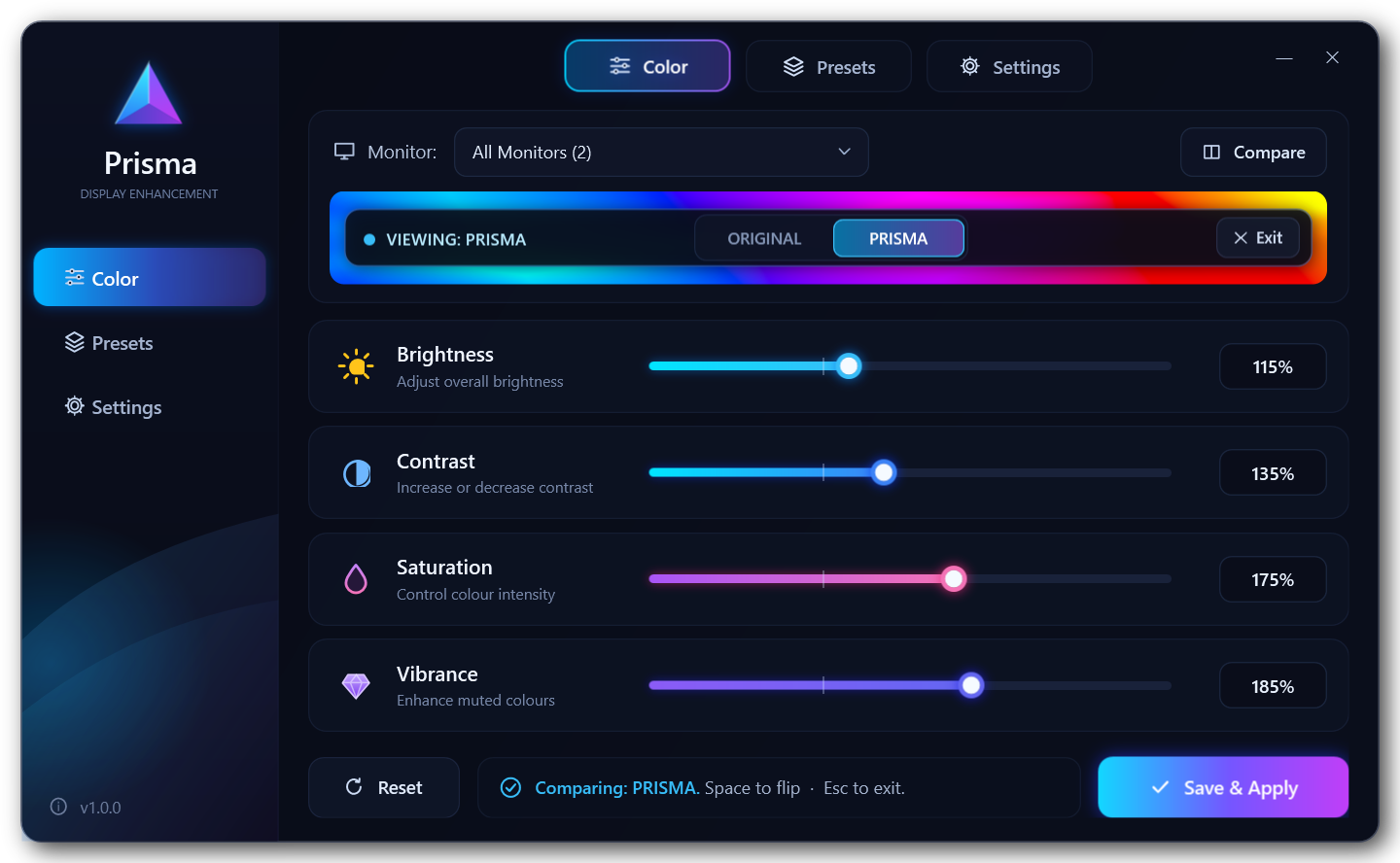
Temporarily toggles your real monitor between its captured original appearance and your active Prisma settings without overwriting saved configs.
Windows startup support
Optional sign-in automation using a Windows scheduled task: choose Apply & Exit (no background process) or Open Window on Startup.
Safe local recovery
Captures pre-Prisma ICC profiles before applying changes, uses atomic config writes with rolling backups, and restores displays cleanly on reset or close.
See the difference directly on your screen.
Click Compare inside Prisma Colour to toggle your real monitor between its original state and active adjustments — press Space to flip or Esc to exit.
Download Prisma Colour
ZIP bundle containing PrismaColour-1.0.0-Setup.exe, README.md, and LICENSE.txt. No separate runtimes, no account, and no background service required.
26499B1D9A90C797B14A3E29D0C3C8E9D807E0979A8AFA6A9C36FBD7F46C100C
What you need
Install in under a minute
- 1Download PrismaColour-1.0.0.zip using the button above and optionally verify its SHA-256 checksum.
- 2Extract the ZIP folder (contains
PrismaColour-1.0.0-Setup.exe,README.md, andLICENSE.txt), then run PrismaColour-1.0.0-Setup.exe and approve the Windows Administrator (UAC) prompt. - 3Keep the default install path (
C:\Program Files\Prisma Colour) or choose your own folder, pick your shortcut options, and click Install. - 4Open Prisma Colour, choose your monitor, dial in your sliders, and click Save & Apply. Once saved, you can close the window.
- 5To revert anytime, click Reset inside Prisma Colour or uninstall via Windows Settings → Apps → Installed apps.
Honest notes on Windows display behaviour
Built like proper desktop software.
Practical, calm, reliable utilities created for PC gamers who want finer control over their setup without heavy bloatware.
Purpose-built software
Each tool focuses on doing one job well instead of bundling bloated suites you never asked for.
Simple interfaces
Clean layouts, clear controls, and immediate visual feedback — easy to understand on first launch.
Useful functionality
Real desktop capabilities like per-monitor hardware profiles, custom presets, and true before/after comparison.
Performance-conscious
Lightweight native Windows apps designed to stay out of your way while gaming — zero heavy web overlays.
User-focused
Local-only settings, transparent limitations, no telemetry, and direct Discord community feedback shaping future updates.
Common questions & quick fixes.
Straightforward answers on how Prisma Colour works, how to troubleshoot display issues, and how to report bugs in Discord.
.icm) and registers it with Windows Color Management. Once you click Save & Apply and close the window, zero Prisma processes remain running. In Apply & Exit startup mode, Windows reapplies your saved profiles at sign-in and exits immediately.
C:\Windows\System32\spool\drivers\color, associate system-wide display defaults in Windows Color Management, and optionally register the logon startup task.
%LocalAppData%\PrismaColour\config.ini.
Win + R, run colorcpl, select your display, and remove any PrismaUI_HW_ profile.
Quick display fixes
- Colours do not change: Confirm you approved the UAC prompt, then run
colorcpl(Win + R) → Advanced → Change system defaults → Advanced and check Use Windows display calibration. - Saturation / Vibrance weaker than expected: Update your NVIDIA, AMD, or Intel GPU driver to a current WDDM 3.0+ release and disable conflicting third-party LUT loaders.
- Game resets display colours: Older exclusive-fullscreen DirectX 9/11 titles can reset the display LUT on launch — switch the game to Borderless Windowed mode.
- Upgrading or uninstalling: Upgrading preserves your presets; uninstalling via Windows Settings → Apps lets you choose whether to keep or delete presets.
Report an issue in Discord
Copy the template below and share it in our Discord server so we can reproduce issues quickly (never include passwords or private information):
Windows version:
Prisma version: Prisma Colour v1.0.0
GPU manufacturer:
Monitor configuration:
Description of the problem:
Steps to reproduce:
Changelog
Every public release, improvement, and fix across Prisma utilities — documented clearly and transparently.